GUI 编写
UltiTools 提供了obliviate-invs的 GUI API,您可以轻松地开发出 GUI 插件,而无需担心 GUI 的实现细节。
感谢Hamza Coşkun的开源项目 obliviate-invs
UltiTools-API 目前提供了两个预制的 GUI 界面:
分页界面 PagingPage 和 确认界面 OkCancelPage
创建一个 GUI
在这里我使用 PagingPage 作为例子。
我想要创建的是一个3行的GUI,最后一行是翻页导航栏,前两行显示内容,点击内容即可执行命令。如下图所示:
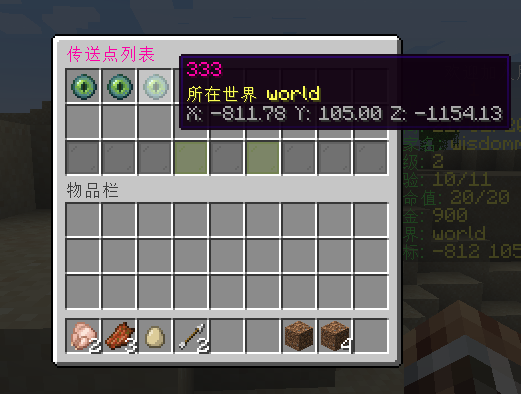
首先,您需要创建一个 GUI 类,继承 PagingPage 类。
java
public class WarpGui extends PagingPage {
    // 新建一个 WarpService 实例(并不重要,只是演示)
    private final WarpService warpService = new WarpService();

    // 你需要重写一个构造函数,用于传递参数,这里的Player参数是必须的
    public WarpGui(Player player) {
        super(
                // 打开GUI的玩家
                player,
                // GUI的ID
                "Warp-list",
                // GUI的标题
                Component.text(BasicFunctions.getInstance().i18n("传送点列表"))
                        .color(TextColor.color(0xFF00A6)),
                // GUI的行数
                3
        );
    }

    // 重写这个方法,用于设置GUI的内容
    @Override
    public List<Icon> setAllItems() {
        List<Icon> icons = new ArrayList<>();
        List<WarpData> allWarps = warpService.getAllWarps();
        for (WarpData warpData : allWarps) {
            Location location = WarpService.toLocation(warpData.getLocation());
            Icon icon = new Icon(UltiTools.getInstance().getVersionWrapper().getEndEye());
            TextComponent textComponent = Component.text(warpData.getName()).color(TextColor.color(0xFF00A6));
            icon.toComp().setName(textComponent);
            String world = String.format(ChatColor.YELLOW + BasicFunctions.getInstance().i18n("所在世界 %s"), location.getWorld().getName());
            String xyz = String.format(ChatColor.GRAY + "X: %.2f Y: %.2f Z: %.2f", location.getX(), location.getY(), location.getZ());
            icon.setLore(world, xyz);
            // 按钮点击事件
            icon.onClick((e) -> {
                player.performCommand("warp tp " + warpData.getName());
                player.closeInventory();
            });
            icons.add(icon);
        }
        return icons;
    }
}
然后在你的命令执行器中调用这个 GUI 类即可。
java
@CmdTarget(CmdTarget.CmdTargetType.PLAYER)
@CmdExecutor(alias = {"warp"}, manualRegister = true, permission = "ultikits.tools.command.warp", description = "传送点功能")
public class WarpCommands extends AbstractCommendExecutor {

    @CmdMapping(format = "list")
    public void listWarps(@CmdSender Player player) {
        WarpGui warpGui = new WarpGui(player);
        warpGui.open();
    }

}
更多的GUI API用法请参考 obliviate-invs Wiki
贡献者
 Ling Bao
 Claude Opus 5.5 (1M context)